

I revisited Practice Better , testing it alongside other leading mental health EHR and practice management platforms to see what it continues to do well, where it can improve, and who it would be a good fit for. Practice Better continues to stand out as a highly flexible platform built around client engagement, workflow automation, and customization that can help complex clinical practices save time.
Practice Better is best suited to practices that blend therapy with coaching or group-based services. Instead of focusing only on notes and billing, it emphasizes tools like highly customizable intake packets, automated form delivery, client messaging, journaling and habit tracking. Pricing starts at $69 per month for the most practical plan, with insurance billing often adding to the cost, but with that you get significantly more flexibility than most traditional therapy EHRs.
For practices that care about client experience and wish to have ongoing engagement and offerings beyond their therapy sessions, Practice Better remains a strong option.
Visit Practice Better
Pros & Cons of Practice Better
 Pros
Pros
- Clean, modern interface that’s intuitive and easy to navigate
- Excellent client engagement tools, including shared journals, custom therapy and wellness programs, and secure messaging
- Powerful automation tools and strong third-party integrations such as Apple Health, Fitbit, Fullscript, and Zapier.
- Reliable built-in telehealth with support for group sessions
- Works well for solo providers and scales well for multi-provider practices
 Cons
Cons
- Costs can increase quickly as add-ons and integrations are layered in
- Electronic insurance claims require a paid third-party Claim.MD account
- The feature set is geared more toward integrative or total wellness care models than strictly insurance-based therapy
- Free trial requires a credit card
Practice Better is a workflow-centric EHR built around flexibility and client engagement. Its biggest strengths are highly customizable intake forms, automation tools, and a client portal that supports ongoing interaction outside of sessions. Features like shared journals, structured programs and courses, protocols, and secure messaging allow clinicians to extend care beyond the appointment itself, while flexible documentation and scheduling tools adapt easily to different practice styles. Together, these tools make Practice Better especially appealing for clinicians who want their EHR to support engagement, organization, and continuity of care without rigid constraints.
Compared to more traditional, documentation-first EHRs, Practice Better places greater emphasis on customization and client-facing experiences. The interface is clean and intuitive, but the platform includes more moving parts than minimalist systems, particularly around forms, automations, and programs. Clinicians who prefer highly structured, session-guided documentation or intensive hands-on onboarding may prefer a more clinician-directed EHR. Those options are covered in our guide to the best mental health EHRs.
Client Records & Intakes
One of the first things that stands out while using Practice Better is how clean and intuitive the whole system feels, particularly when it comes to managing client records. It’s one of those systems where you don’t have to hunt through menus or click five layers deep to find what you’re looking for. Everything is exactly where you anticipate it to be, making navigation a breeze. From the client list to the calendar to individual charts, everything flows naturally; they’ve clearly put a lot of thought into what real-world practitioners actually need.
Practice Better includes a Client Hub view that acts like a floating mini-chart you can summon and keep with you anywhere in the system. It lets you pull up a client’s core details—demographics, history, notes, protocols, forms, and even lab results—without leaving the page you’re working on. You can drag it around your screen or keep multiple client hubs open at once. It sounds like a small thing, but it makes multitasking and documenting mid-session significantly easier than in most other EHRs I’ve tried.
There’s also a strong tagging system that helps keep client data organized over time. You can create custom tags (such as “Sliding Scale” or “A&D Group Participant”), assign colors to them, and then use those tags to sort, search, or trigger automations. It’s an efficient way to group clients without relying on rigid folders or constantly digging through advanced filters.
Another notable feature is the client journaling tool, which allows clients to log reflections, moods, symptoms, or prompted entries between sessions. Journals can remain private to the client or be shared with the provider, and entries are accessible directly from the client record. It’s a lightweight but effective way to track progress over time and maintain continuity of care without complicating documentation.
Altogether, Practice Better delivers a client records system that’s fast, flexible, and genuinely easy to work with day to day. It earned 5 out of 5 stars in the Client Records & Data Management category.
Scheduling & Calendar Management
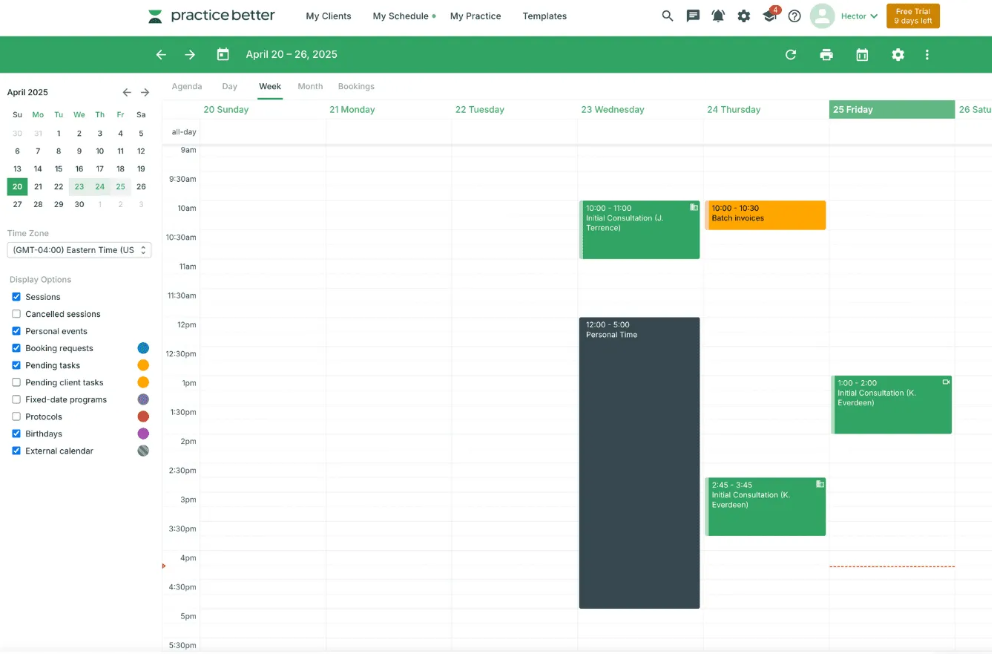
The scheduling system in Practice Better is one of the better ones I’ve had the chance to work with. It’s drag-and-drop, highly customizable, and doesn’t make you feel like you’re juggling spreadsheets just to get through your day. You can set up multiple calendar views, create different appointment types, block time, and manage both individual and group sessions without it turning into a mess.
One of the most refreshing aspects is how non-intrusive the interface feels. You’re not constantly being kicked to new pages when you click something. Most actions happen in clean overlays and pop-ups, which means you can schedule or reschedule appointments without losing your place or closing other tabs. That sounds minor, but when you’re balancing back-to-back sessions and documentation, it genuinely reduces friction.
When creating an appointment, there’s a lot of flexibility built in. You can customize rates, assign service codes, leave internal notes or client-facing instructions, and decide whether sessions require manual confirmation or client self-confirmation. Buffer times between sessions are easy to set, and the calendar can also be used to track non-session tasks, admin time, or multi-week programs alongside standard appointments.
On the client side, the booking experience is just as thoughtful. Clients can schedule directly through the portal, request sessions outside of your set availability, or book through a widget embedded on your website. Behind the scenes, scheduling ties cleanly into Practice Better’s automation engine, allowing you to trigger reminders, forms, or follow-ups based on appointment activity with very little manual setup.
Considering all of this, Practice Better earned 5 out of 5 stars on the Calendar and Scheduling category of our scoring criteria.
Billing & Payments (RCM)
Practice Better approaches billing and payments with flexibility in mind, but it’s not a fully self-contained RCM system in the way some EHRs are. Instead, it offers solid tools for both insurance-adjacent workflows and private-pay practices, with optional integrations filling in the gaps depending on how your practice operates.
For insurance billing, Practice Better relies on a third-party clearinghouse integration with Claim.MD rather than offering native claims submission. If you want to submit electronic claims (EDI), you’ll need a separate Claim.MD account, which starts around $30 per month plus per-claim fees, with unlimited plans also available . Despite requiring an external account, you can still submit claims and track them within Practice Better, instead of being forced to rely on Claim.MD’s interface.
On the private-pay side, Practice Better is much stronger. The platform supports built-in payment processing as well as integrations with Stripe and Square, allowing clients to pay for sessions, packages, or programs directly through the portal. You can create one-off charges, recurring subscriptions, installment plans, or bundled packages, and automate receipts, reminders, and unpaid balance notifications. The client-facing payment experience is clean, mobile-friendly, and intuitive, which reduces friction and follow-up admin work.
What stands out most is how configurable everything feels. You’re rarely boxed into a single billing flow, which makes Practice Better especially appealing for practices that mix insurance, self-pay, group programs, or coaching-style offerings.
Reporting & Administrative Tools
Practice Better offers a strong and thoughtfully designed set of reporting and administrative tools that make it easy to understand what’s happening across your practice without feeling overwhelmed by data.
Inside the reporting dashboard, you can quickly pull insights on appointments, cancellations, packages and programs, payments, revenue, taxes collected, and transaction history. There are also reports for incomplete notes, unsigned forms, client engagement with programs, and journal activity, which helps surface issues before they become administrative headaches.
On the administrative side, Practice Better does a good job supporting multi-user workflows. You can assign roles, limit access by permission level, and manage administrative users without much friction. Automations also play a role here—reminders, form delivery, payment triggers, and follow-ups can all be configured to reduce manual work and keep operations moving smoothly in the background.
Cost & Pricing
Practice Better offers several pricing tiers designed to support a wide range of health and wellness practices. While all plans include core scheduling, documentation, and client portal features, the differences between tiers primarily regard client engagement tools, automation, and features for group practices. Most clinicians will likely favor the Starter or Professional plans, depending on caseload size and feature needs.
Sprout Plan – Free
Best for: Students, recent graduates, or clinicians testing the platform with a very small caseload.
Practice Better’s Sprout plan is a free, entry-level tier intended for early-stage clinicians. It allows you to try out Practice Better’s core features with up to 3 clients for as long as you like.
While Sprout includes core scheduling, documentation, and client portal functionality, because of restrictions on some advanced features and the 3 client cap, most clinicians will outgrow this plan quickly once they begin seeing clients consistently.
That said, Sprout can be a useful way to get familiar with Practice Better’s interface and workflow before committing to a paid plan, especially for students or clinicians preparing to launch a practice.
Starter Plan – $35 monthly
Best for: Very small practices, side-hustle clinicians, or those just starting out.
The Starter plan increases capacity to up to 10 clients and adds essentials like mobile apps, a client portal, and built-in telehealth.
For clinicians with a small, steady caseload, Starter can cover the basics. However, its client cap and limited collaboration tools mean it’s best suited for early-stage or low-volume practices rather than full-time providers.
Professional Plan – $69 monthly
Best for: Full-time solo providers ready to add group sessions and scale comfortably.
For many clinicians, Professional is the best-value plan. It supports up to 300 clients and unlocks many of the workflow tools that make Practice Better appealing in day-to-day use, including group scheduling and telehealth, client messaging, and other integrations.
This plan offers a strong balance between flexibility and cost, making it a solid choice for full-time solo providers or part-time group practices that don’t yet need advanced branding or automation features.
Plus Plan – $99 monthly
Best for: Established practices that want deeper automation and all client engagement features.
The Plus plan removes client limits entirely and adds more advanced workflow and branding tools. This includes customizable branding, snippets and advanced automations, and monthly credits for text reminders and faxing.
The Plus plan also introduces admin users, making it better suited for practices with shared administrative responsibilities or more complex internal workflows.
Team Plan – $155 monthly (includes 2 practitioners)
Best for: Group practices or multi-provider clinic
The Team plan is designed specifically for collaborative practices. It includes everything in Plus with two provider accounts included, along with team-based roles and permissions, shared templates and programs, centralized billing and reporting, and unlimited admin accounts.
Additional practitioners cost $50 per month each, with volume discounts available for larger teams.
User Reviews
Across major user review platforms, Practice Better receives consistently positive feedback, especially from solo providers and small practices looking for an all-in-one system. Users frequently praise its automation tools, customizable workflows, and strong client engagement features, along with responsive support during onboarding and setup. Criticism tends to focus on a learning curve for new users, occasional usability friction, and pricing concerns for very small or early-stage practices.